Welcome to IToxy.com

Hi, Welcome to IT Oxy. This blog is primarily aim to share our information on Information Technology. I really appreciate if you are willing to give any input to this blog. If you want to share something, email at: admin@IToxy.com If you found any post interesting and useful, then please leave a comment and share with your friends.

Welcome to IToxy.com

Hi, Welcome to IT Oxy. This blog is primarily aim to share our information on Information Technology. I really appreciate if you are willing to give any input to this blog. If you want to share something, email at: admin@IToxy.com If you found any post interesting and useful, then please leave a comment and share with your friends.

Welcome to IToxy.com

Hi, Welcome to IT Oxy. This blog is primarily aim to share our information on Information Technology. I really appreciate if you are willing to give any input to this blog. If you want to share something, email at: admin@IToxy.com If you found any post interesting and useful, then please leave a comment and share with your friends.

Welcome to IToxy.com

Hi, Welcome to IT Oxy. This blog is primarily aim to share our information on Information Technology. I really appreciate if you are willing to give any input to this blog. If you want to share something, email at: admin@IToxy.com If you found any post interesting and useful, then please leave a comment and share with your friends.

Welcome to IToxy.com

Hi, Welcome to IT Oxy. This blog is primarily aim to share our information on Information Technology. I really appreciate if you are willing to give any input to this blog. If you want to share something, email at: admin@IToxy.com If you found any post interesting and useful, then please leave a comment and share with your friends.

Send an Anonymous Email Message With Note2Email

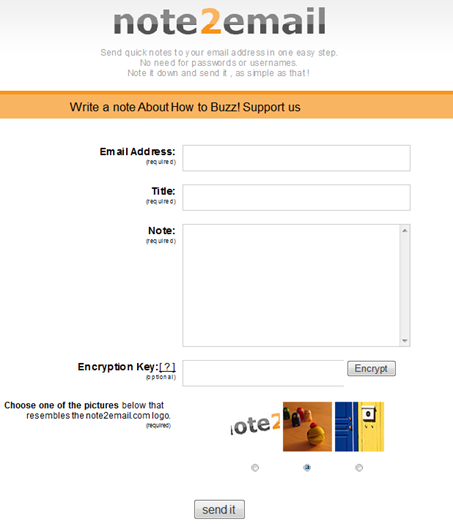
Note2Email is a simple web service that lets you send email messages anonymously to anyone without signing up with the service.You can optionally enter in a special encryption key such that the recipient will only be able to read the email if they know it.

When browsing the Internet from an untrusted network or an office computer it can be unsafe to type in the email account password. This tool was designed to help users send themselves email notes without logging in to their email account

Your IP address is not passed in the message header so your identity remain hidden and the email recipient will never know who exactly sent that message and from where.
Features

  • Your email will be from "note[at]note2email.com",which enables you to set up a filter in your email service or program and create a repository folder for notes sent to yourself.

  • Note2email relieves you from needing a web-based email if sending email notes from a computer that’s not your own.

  • Note2email relieves you from needing to log into web-based email in order to send email notes from a computer that’s not your own. This is both more secure (alleviates any risk of compromising your account password) and will save you time otherwise spent logging in.

  • You can send email with a special encryption key that you specify. Your recipient will only be able to view the email if they can enter in your key.

  • Spam protection: you will need to identify the note2email logo from other random images to send email with note2email. This protects against random spammers using the service for junk mail.

  • note2email allows you to send email fairly anonymously to any address. (Note: anybody with little technical skills can send an email disguised as being from anyone they choose. At least with note2email the sender is "note2email" and not some fake identity).

  • Bookmarklet for taking quick notes by email is in the works.

    Note2email

  • Google Email Uploader

    The Google Email Uploader is a desktop utility for Microsoft Windows that uploads email and contacts from other desktop email programs (like Microsoft Outlook) into your Google Apps mailbox. The Email Uploader preserves information such as sent dates and sender/recipient data, as well as the folder structure used by the other email program. The Google Email Uploader requires a Google Apps account.
    The Email Uploader is Apache 2.0 licensed open source software, and is governed by the terms of the included license file. This means you may modify the tool to better suit your needs


    Unlocking Administrator Account In Windows Vista

    Deep inside Windows, there’s a secret Administrator account, and it’s different from the normal administrator account you most likely have set up on your PC.On Vista, the difference is more than the name: the Administrator account is not subject to User Account Control. So the Administrator can make any changes to the system and will see no UAC prompts.

    For this reason, you may want to unlock the Administrator account, and use it only for those times when you want to make a series of system changes and don’t want to be bothered by UAC. True, you could instead simply disable UAC on your system, but it’s a pain to do this, and you may forget to turn it back on.

    Turning on the Administrator account is straightforward.

    You can unhide or turn on the Administrator account using the steps below:

    1. Type cmd in the Search field on the Start menu. Right click the command prompt icon at the top of the Start menu and click Run as administrator.
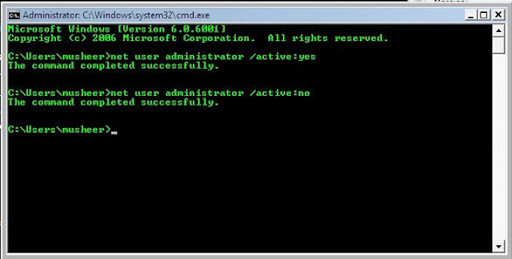
    2. Type ‘Net user administrator /active:yes’.

    pic

    Once you complete these steps, the Administrator account will appear on the Welcome screen. To disable once again hide the account, repeat step 1 described above and type ‘Net user administrator /active:no’.

     
    Copyright 2008 IToxy