Welcome to IToxy.com

Hi, Welcome to IT Oxy. This blog is primarily aim to share our information on Information Technology. I really appreciate if you are willing to give any input to this blog. If you want to share something, email at: admin@IToxy.com If you found any post interesting and useful, then please leave a comment and share with your friends.

Welcome to IToxy.com

Hi, Welcome to IT Oxy. This blog is primarily aim to share our information on Information Technology. I really appreciate if you are willing to give any input to this blog. If you want to share something, email at: admin@IToxy.com If you found any post interesting and useful, then please leave a comment and share with your friends.

Welcome to IToxy.com

Hi, Welcome to IT Oxy. This blog is primarily aim to share our information on Information Technology. I really appreciate if you are willing to give any input to this blog. If you want to share something, email at: admin@IToxy.com If you found any post interesting and useful, then please leave a comment and share with your friends.

Welcome to IToxy.com

Hi, Welcome to IT Oxy. This blog is primarily aim to share our information on Information Technology. I really appreciate if you are willing to give any input to this blog. If you want to share something, email at: admin@IToxy.com If you found any post interesting and useful, then please leave a comment and share with your friends.

Welcome to IToxy.com

Hi, Welcome to IT Oxy. This blog is primarily aim to share our information on Information Technology. I really appreciate if you are willing to give any input to this blog. If you want to share something, email at: admin@IToxy.com If you found any post interesting and useful, then please leave a comment and share with your friends.

Circle Dock - Drag and drop your files folders and shortcuts onto a circular

Like most application launches, Circle Dock comes with a list of icons for frequently used programs, like the Control Panel, your default browser, and the recycling bin. You can add shortcuts by dragging them from your desktop or quick launch bar and customize to your heart's content.

Circle Dock has a ton of visual customization options as well. You can either display your icons in concentric circles, or as a spiral. You can add a rotating animation effect to the spiral to make yourself dizzy. There are a more than 30 skins to choose from.

This attractive freebie turns the usual ribbon-like dock inside out. Its default shape is a set of concentric circles, but it can also take the form of a spiral. You can further personalize the look with included skins and your own icons. The settings window offers useful tweaks as well, such as conditions for hiding the dock and a Portability Mode that lets you tote Circle Dock on a USB drive

What Circle Dock Allows You to Do:
  • Drag and drop your files, folders, and shortcuts onto a circular or spiral dock.

  • Rotate the dock with either your mouse wheel or the keyboard arrow keys.

  • Change the image shown for the icons and change the skins (compatible with icons and skins for Rocket Dock, Object Dock, etc.)

  • Ability to run the program from a portable USB memory stick and have the links in the dock point to the documents on the USB memory stick.

  • Ability to synchronize the links on the dock with the files, folders, and shortcuts on your desktop or other folders in real-time.

  • The dock appears where your mouse is by pressing a hotkey.

  • Works on computers with multiple monitors

 image


Download |7.81MB |Freeware

Sys Req:

  • Windows XP or Vista (32 or 64 bit)
  • .Net Framework 2.0 or higher. Vista users already have the .Net Framework - no need to install anything else. Most Windows XP users have the .Net Framework installed from Windows Update.
  • If you are unsure if you have the .Net Framework installed or are getting error messages, go to http://www.microsoft.com/net/Download.aspx and install the latest version of the .Net Framework.
  • Safely Remove Your USB Devices with EjectUSB

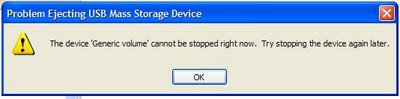
    Do you having hard time to safely remove your USB devices from your Windows and often encountered this error message, “The device cannot be stopped right now. Try stopping the device again later”? How can you put an end to this problem?

    image

    Well, I frequently ran into the same problem too last time but now not anymore after I’ve found Unlocker. You can read my previous blog entry to learn more about this small but useful utility. Using Unlocker is one of the solutions for this problem. The reason why this happen is that there are still programs that run from the USB device during the moment you try to eject the USB device.

    Besides Unlocker, EjectUSB is another essential Windows tool that you can try out. This open-source program will close all programs running from your USB device and then safely eject the USB drive. Click here to see EjectUSB in action. Other functionalities that EjectUSB offers are flushing the file cache, closing Explorer windows and removing registry entries and Recent Document shortcuts referencing the specified USB drive.

    To use EjectUSB, you need to first extract the content of the downloaded zip file onto your USB device. Next, you need to run the “EjectUSB.exe” from the USB device that you are attempted to eject. Then, let the program take care the rest of the task. So easy!

    EjectUSB is compatible with all Windows OS. If you ask me which one do I prefer between Unlocker and EjectUSB, I will pick EjectUSB.

    Download EjectUSB Now! | 252 KB

    How to Find Your Windows XP Product Key From Windows XP CD?

    Do you know where is your Windows XP product key hiding inside the Windows XP CD? If you have no idea where is it, let me show it to you. Follow the instructions below to locate the product key.

    image 

    Insert Windows XP CD into your computer.

    1. Right-click open your Windows XP CD.
    2. Open the i386 folder.
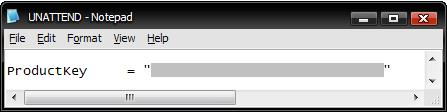
    3. Now, look for this text file, UNATTEND.txt.
    4. Open the text file and scroll your way down to the bottom of the file.

    And there you go, your Windows XP Product Key.

     
    Copyright 2008 IToxy